I put Jev behind the coffee recommender on my site. Jev is TypeSafe’s typed-decision (“System One”) model, and Cloudflare Workers AI serves it as typesafe/jev.
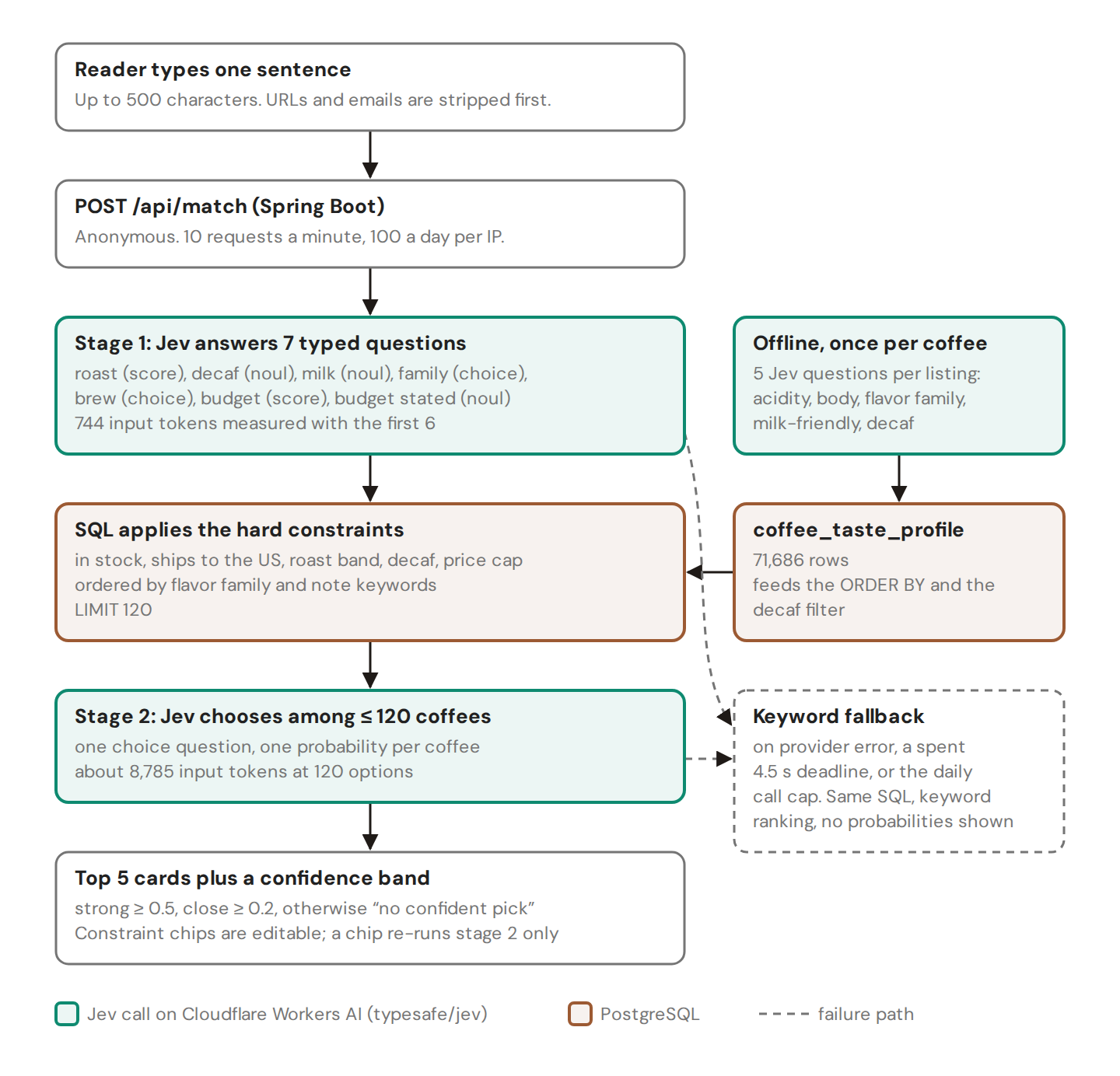
A reader types one sentence. Jev turns it into typed answers, SQL cuts 74,036 coffees to at most 120, and Jev picks the top five. Six live requests on September 30 took a median of 764 ms on the server. A match costs about $0.0004. It runs at mycoffeeexplorer.com/recommendations.
1. Confidence is not “the reader said so”
A Jev score question returns a position on your scale plus aconfidence. TypeSafe computes confidence from how the probabilities are spread. A peaked answer scores high whether or not the text mentions the topic.
I asked for a budget on three levels: under $15, $15-25, over $25. Sentences that never mention money came back “$15-25” at confidence 0.59 to 0.80. My threshold was 0.4, so SQL silently capped those readers at $25.
The fix, committed the same day, is a separate yes/no question: a noul called budget_stated, “Does the reader state a price, budget, or how much they want to spend?” With it, the price cap applies only when that answer is 0.5 or higher. If a filter depends on whether the reader mentioned something, ask that as its own question.
2. Ask typed questions instead of parsing a prompt
Jev takes one state string and a map of typed questions. A noul returns a yes-probability. A choice returns one probability per option, up to 255 options. A score returns a position on your scale. No prose comes back, so there is nothing to parse and nothing to leak into the UI.
This is the stage-1 request as Workers AI received it on September 30, before I added budget_stated:
{
  "model": "typesafe/jev",
  "input": {
    "state": "Reader's own words about the coffee they want: \"Espresso with oat milk every morning. I want chocolate, caramel, nutty, low acidity. Medium-dark or dark roast. Nothing sour.\"",
    "questions": {
      "roast":  { "type": "score", "instructions": "What roast level does the reader prefer?", "criteria": ["Light", "Medium", "Dark"] },
      "decaf":  { "type": "noul", "instructions": "Does the reader require decaf?" },
      "milk":   { "type": "noul", "instructions": "Will the reader add milk to the coffee?" },
      "family": { "type": "choice", "instructions": "Which flavor family does the reader want most?",
        "criteria": {
          "fruity": "Berries, stone fruit, citrus, tropical",
          "floral": "Jasmine, rose, tea-like",
          "chocolate": "Cocoa, dark chocolate, fudge",
          "nutty": "Almond, hazelnut, peanut",
          "caramel": "Caramel, brown sugar, toffee, honey",
          "spicy": "Cinnamon, clove, pepper",
          "earthy": "Earthy, tobacco, cedar, smoky"
        } },
      "brew":   { "type": "choice", "instructions": "How does the reader brew?",
        "criteria": {
          "espresso": "Espresso machine, moka pot, or milk drinks like latte and cappuccino",
          "pour_over": "Pour-over such as V60, Chemex, Kalita",
          "drip": "Automatic drip or batch brewer",
          "french_press": "French press or other immersion",
          "cold_brew": "Cold brew or iced coffee",
          "unspecified": "The reader does not say how they brew"
        } },
      "budget": { "type": "score", "instructions": "What price per bag does the reader want?", "criteria": ["under $15", "$15-25", "over $25"] }
    }
  }
}
The answer: roast 1.98 on the 0-2 scale at confidence 0.97, milk 0.96, chocolate 0.86, espresso 0.97, and budget “$15-25” at confidence 0.80 for a sentence with no price in it. 744 input tokens, 316 ms.
Two gotchas. The REST route is POST /accounts/{account_id}/ai/run with the model name in the body; /ai/run/typesafe/jev returns HTTP 400 “No route for that URI”. And the answers sit at result.result.answers, not at the top level as in TypeSafe’s direct API.
3. Filter in SQL before the model
choice never refuses. In my first test I asked for a decaf from 55 coffees that included no decaf, and Jev picked a medium-roast blend at 0.91. It ranks whatever you give it.
So SQL enforces every hard constraint: in stock, ships to the US, roast, decaf, price. It orders the survivors by taste fit and keeps 120 rows. On a local PostgreSQL 16 copy with 74,003 rows that query takes 58 ms.
I stopped at 120 options, not 255. Same request, three runs each: at 255 options median confidence fell from 0.81 to 0.32, input tokens doubled from 8,785 to 17,844, and median latency rose from 450 to 526 ms. Near-identical options spread the probability thinner instead of improving the pick. Those runs used OpenCode Zen’s jev-1.13-free route (same model family).
4. Keep a fallback that says what it is
If Jev errors, if both stages run past a 4.5-second deadline, or if a machine hits its cap of 20,000 provider calls a day, the same SQL runs and a keyword ranker orders the rows. The page shows no probabilities and says it is keyword matching. The reader still gets coffees, and nothing claims the model picked them.
5. Do the cost math per call
Workers AI charges $0.042 per million input tokens for Jev. Output tokens are free.
- Stage 1, 744 tokens: $0.00003.
- Stage 2 at 120 options, 8,785 tokens: $0.00037.
- One match: about $0.0004. 1,000 matches: $0.40.
- Scoring 71,686 coffees once, five questions each, 46,875,577 tokens: $1.97.
I prepaid $10 of AI Gateway credit with auto top-up off. With the 20,000-call daily cap, a traffic spike or a script cannot become an open-ended bill.
Jev is not the cheapest option. My old Groq llama-3.1-8b-instant path over 20 options cost about $0.00005 a call by my estimate. I pay 8x more for typed output over 6x as many candidates.
6. Plan batch jobs around the gateway, not the model
The one-time catalog run assumed 1,200 requests a minute. Cloudflare’s AI Gateway docs list 200 requests a minute per gateway under Unified Billing. My second pass hit sustained HTTP 429s: 6,749 successes and 9,715 failures before I stopped it. I never pinned down which layer sent them.
The third pass ran two workers with a shared 60-second cooldown on any 429, honoring Retry-After, and at most two retries per coffee. It scored the remaining 27,886 coffees with zero failures.
7. Test free-text SQL on real PostgreSQL
My first tests ran the candidate query on H2 in PostgreSQL mode with a handful of fixture rows. They passed. Then I loaded 74,003 real rows into a throwaway PostgreSQL 16:
- A NUL byte placeholder. Unused keyword slots were bound to a NUL byte. H2 accepted it. PostgreSQL returned
invalid byte sequence for encoding "UTF8": 0x00, so every request with fewer than three flavor keywords failed with HTTP 500. LIKE '%US%'matched AUSTRALIA and AUSTRIA. 22,198 of the 74,003 rows slipped through the ships-to-US filter. Wrapping the region list in commas and matching%,US,%fixed it.
Now every query that binds free text or uses LIKE gets a Testcontainers PostgreSQL test. H2’s PostgreSQL mode is not PostgreSQL.